Widget Custom CSS Not Saving

empire's Avatar
empire · in Bug Report
6 replies 21 views

I've noticed a small issue with the Custom CSS field when editing a widget. If I remove all the CSS and save, the changes don't seem to clear the field.

If I put just: .in the box and save, it saves fine. But if I then remove the . and save again, the . comes back.

It seems the Custom CSS field won't allow itself to be completely empty.

Just wondering if this is intended behaviour or a bug?

Thanks.

"Please remain seated. The captain has absolutely no idea what he’s doing."
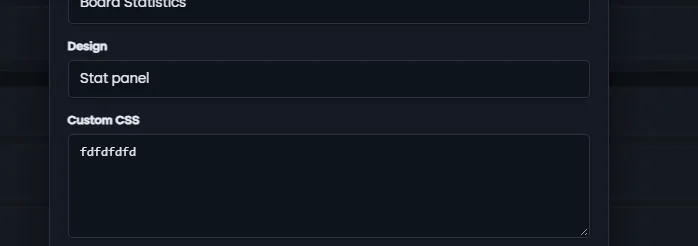
Which widget is this? As I have just tried it for a random widget and I could add CSS, and remove it completely, leaving it blank.

Only tried it on two widgets, “Tell a friend” and “Board Statistics”

The only way I could get the Custom CSS box completely clear was to delete the widget completely and then add it again. After doing that, the CSS box was empty.

But you shouldn't have to do that. If you add CSS code to the box and later decide to remove it, then you should be able to simply delete the code, save the widget, and have the CSS removed.

At the moment, the CSS doesn't fully clear unless the widget itself is deleted and re-added. I even clear cached and nope

"Please remain seated. The captain has absolutely no idea what he’s doing."

On Sep 18, 2026, empire said:

Only tried it on two widgets, “Tell a friend” and “Board Statistics”

The only way I could get the Custom CSS box completely clear was to delete the widget completely and then add it again. After doing that, the CSS box was empty.

But you shouldn't have to do that. If you add CSS code to the box and later decide to remove it, then you should be able to simply delete the code, save the widget, and have the CSS removed.

At the moment, the CSS doesn't fully clear unless the widget itself is deleted and re-added. I even clear cached and nope

It also depends what custom code you add to your site. The more custom code like JS and CSS you add, the more chance you have it will conflict with something. JS is a bit notoriously for creating conflicts. 😉

On Sep 18, 2026, Cedric said:

It also depends what custom code you add to your site. The more custom code like JS and CSS you add, the more chance you have it will conflict with something. JS is a bit notoriously for creating conflicts. 😉

Well, I can’t work it out.. I disabled my main theme. Added a clean default theme and removed all that’s in “Board templates”

Still the dfdffddffdfd I put in as a text will not get removed

"Please remain seated. The captain has absolutely no idea what he’s doing."

I logged in quickly; and deleted the text for you. There is indeed a bug in the ACP not allowing it to clear. The front end widget studio does allow it.

To be fair, we will likely retire the ACP widget manager as it is an entirely different code base and to prevent confusion in the future.

Made me spend 10 mins looking at JS and CSS for conflicts, and turns out it was an ACP bug 🤪

Well, I use front-end for now, even thoughI’m used to it via ACP.. even on Invision, I’m used to doing it via ACP

"Please remain seated. The captain has absolutely no idea what he’s doing."

Theme: FS 2.0
Create Your Community with ForumSpark

ForumSpark is a modern community platform built on custom software. It combines the familiar feel of classic forums with a fast, simple experience designed for today’s communities.